

New · v1.6.4 — scroll through the maps, click the map to change quest, a more compact Plan window

The WoW achievement tracker & guide addonEvery achievement.
One path.

Achievement Pathfinder shows exactly which World of Warcraft achievements you're still missing — then points you straight to them. An in-game addon plus a web app, for Retail and WoW Forever.

  • Official Blizzard APIs
  • 100% ToS-safe
  • Free addons
  • No setup
New · Realms of Forever — the WoW Forever census

OLYMPUS — the largest guild family in WoW Forever

Every race, class and guild of the beta, counted by independent census sites and compared side by side. Counted in-game by the Olympus addon: 79,160 soldiers across the PvP and PvE realms — the realm of Asmongold, the One True King.

  • 79,160soldiers counted in-game
  • 4,640+seen by public census sites
  • 70OLYMPUS guilds listed publicly
9,000+Retail achievements indexed
111WoW Forever achievements
4Regions · EU · US · KR · TW
100%Official APIs · ToS-safe

Free in-game addon

WoW Forever · v1.6.4
  • New in 1.6.4 — a small fix: the filter chips of Find quests stay inside their column in the compact Plan window.
  • New in 1.6.3 — scroll through the maps like in Google Earth, click a quest marker on the map and Pathfinder follows, more places for more quests, an arrow you can switch off, a setup guide, and a more compact Plan window.
  • New in 1.6.2 — an arrow and a box that let your clicks through, routes that say what they are for with a card on the world map, achievement markers in purple, and the map markers on the minimap.
  • New in 1.6.1 — a new name and a new look, Here (your next best step), a Route Planner, Find quests, a Gear page and Display with a live preview.
  • Plan window — a whole new, separate window: every dungeon with its banner, bosses, loot and the gear that beats what you wear.
  • On-screen extras — threat % above your target, an FPS and latency bar with a right-click menu and coordinates, a buff row, a leveling tracker and the game's own damage meter and cooldown numbers, all optional.
  • Upgrade marks — numbers in the tooltip and a small arrow on the items in your bags: better or worse than what you wear (like Pawn).
  • Nearby & the Hunter's guide — the nearest trainers, stable master and repair vendor with an arrow and map markers, and tameable pets by zone for hunters.
  • Quest tracker with an arrow, quest levels and Elite tags, and chains with the steps that count.
  • Achievements stay the guideline — every dungeon and quest names the achievement it gives; every achievement says what to do for it.
  • Every achievement in the Plan window — all 111 in 24 categories with live, per-character progress, in four views (To chase, Nearest, All, Done) and a search through all of them. Compact mode stays in the compact window (/ap old).
Web app & full catalog

Any browser · installable
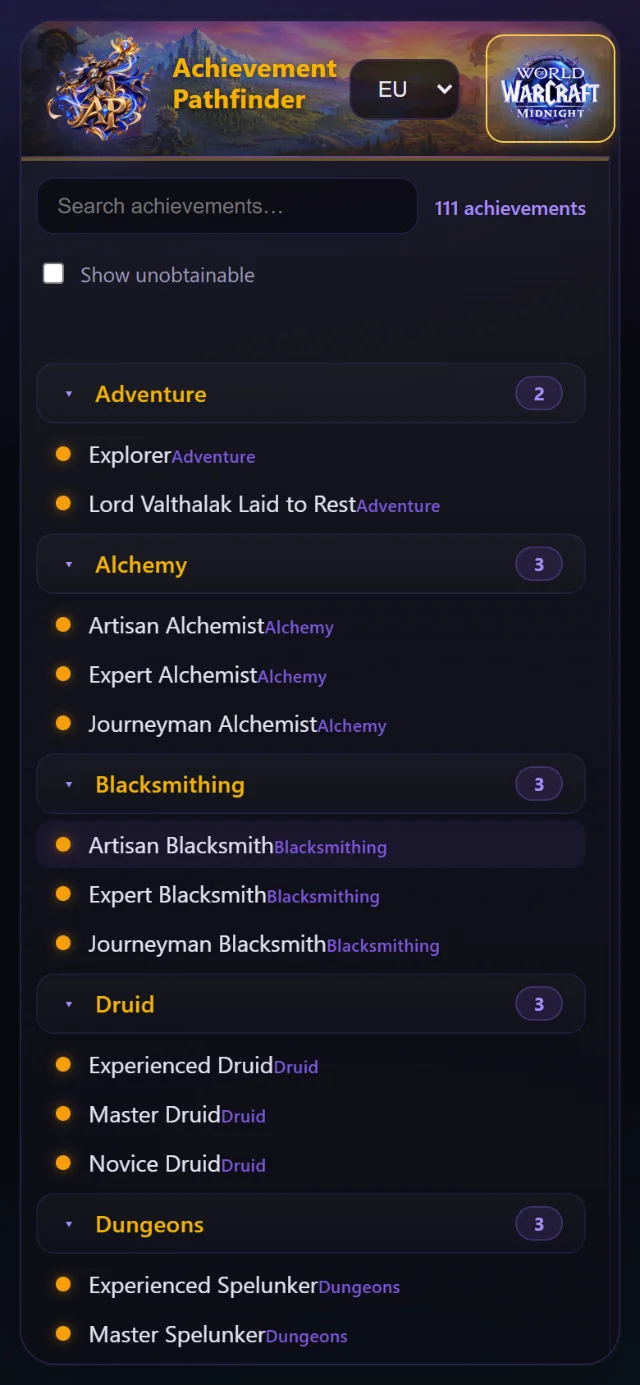
  • Every Forever achievement with descriptions, categories and filters.
  • Switch to Retail's 9,000+ achievements in one tap.
  • Your Forever status lands automatically when Blizzard opens the API.
New in 1.6.1 · WoW Forever

A new name, a new look — and a lot more

The addon is called Pathfinder now: it does far more than achievements. The quest tracker, every page of the Plan window and the pieces on your screen are in a new glass look, and the Route Planner, Gear, Display and Find quests have pages of their own. Your settings come along.

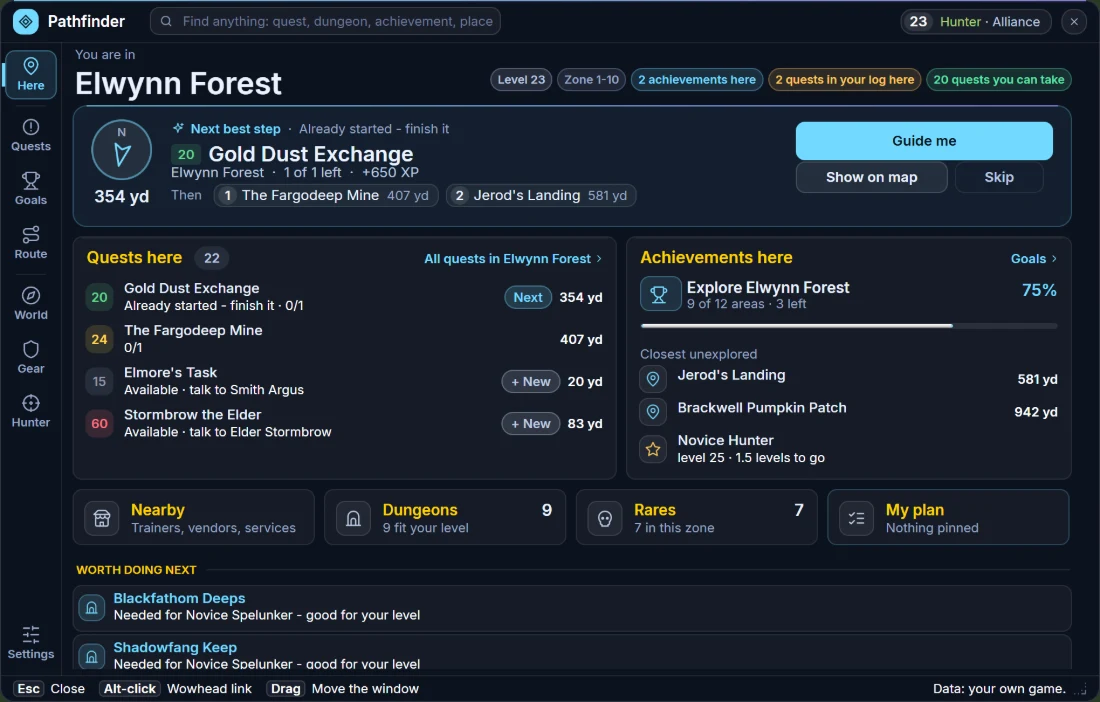
Here: your next best step

The zone you are in, a compass to the next thing worth doing, the quests and achievements right here, and shortcuts to Nearby, Dungeons, Rares and your plan.

Route Planner

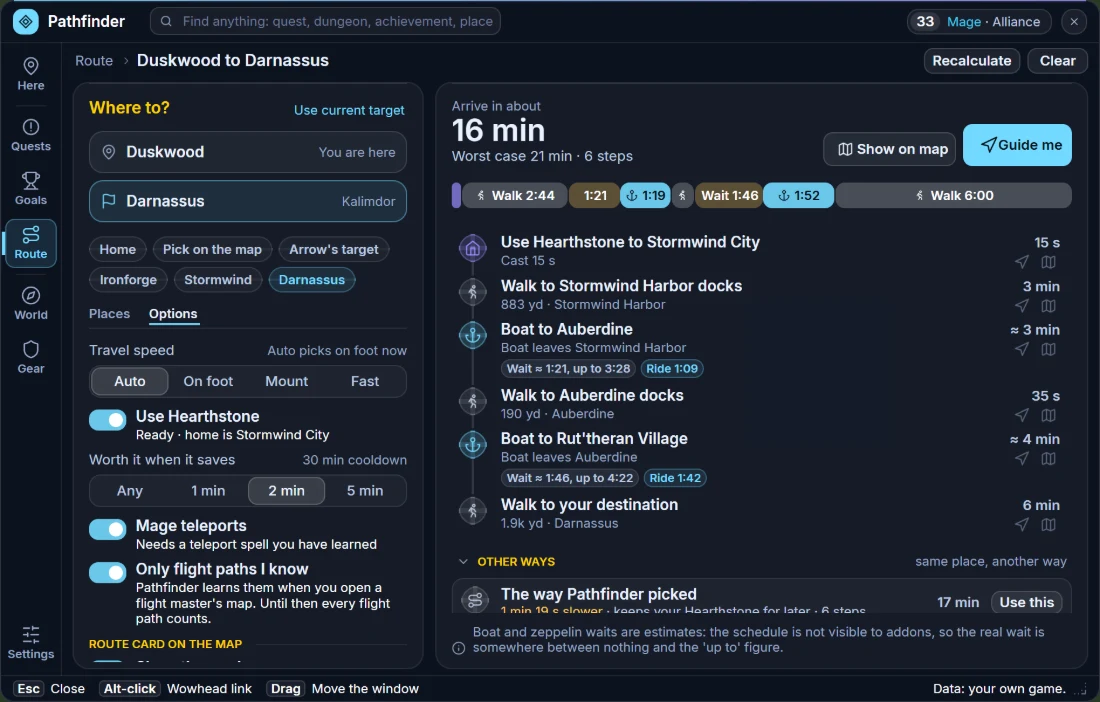
The fastest way to any zone, city or dungeon by walking, flight paths, boats, zeppelins, your hearthstone and teleports — with a time bar and the time of every step.

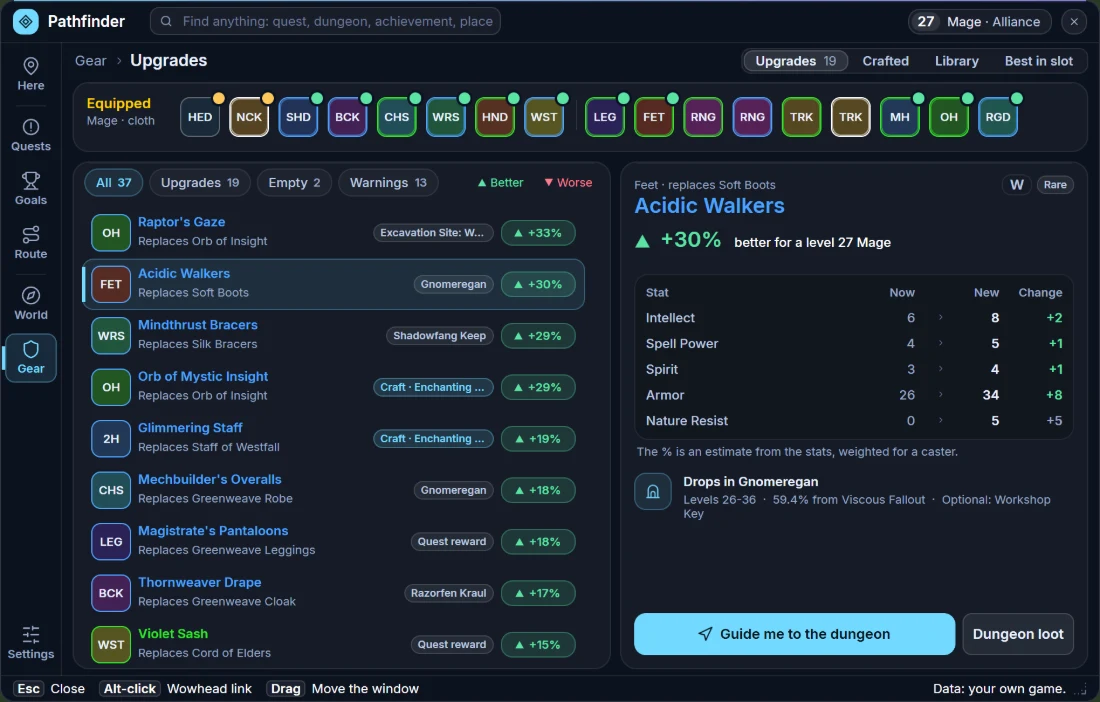
Gear at a glance

A row of tiles shows what you wear. Pick a piece to see the stats now and new, where it comes from and the way there; what you cannot use yet says why.

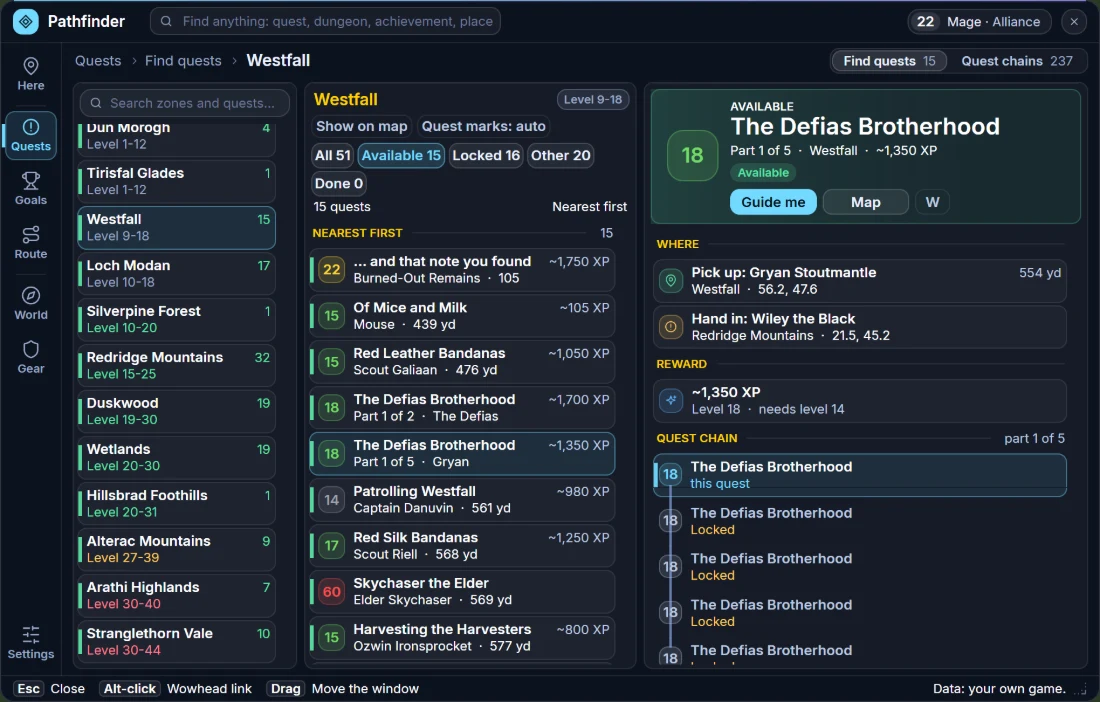
Find quests

Every quest you can pick up, zone by zone, why the others have to wait, and the whole chain of the one you pick — in three columns.

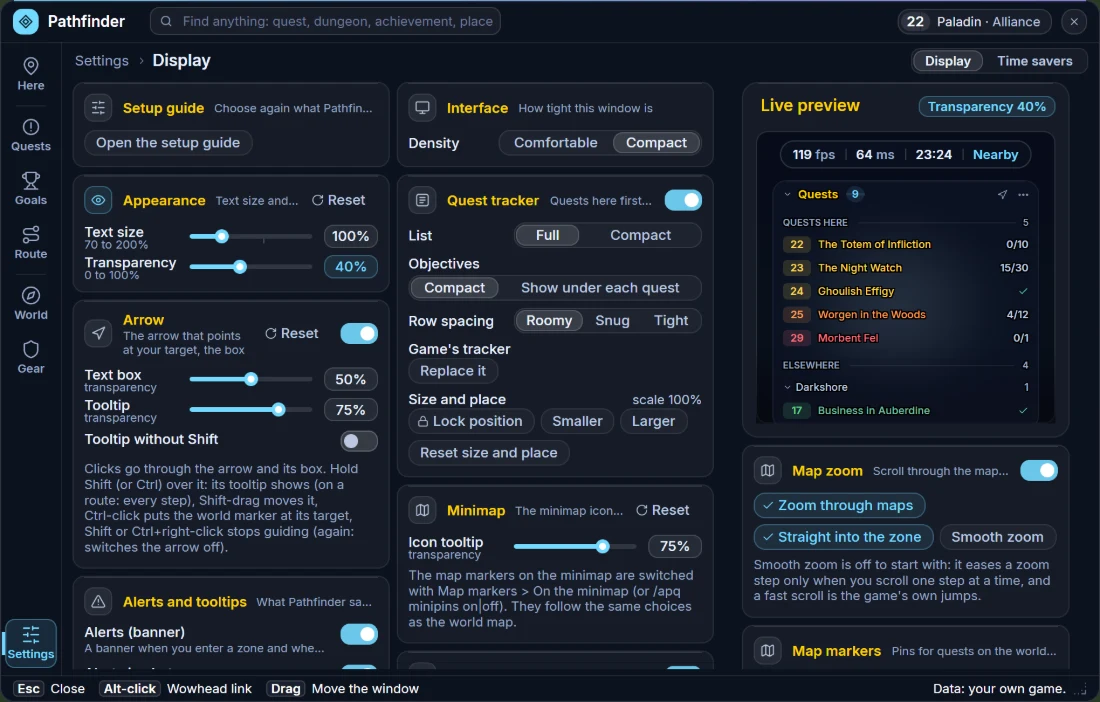
Display with a live preview

Sliders for text size and transparency, row spacing for the tracker, and every on-screen extra in one place.

Levels and quests on the map

Every zone on the continent maps shows its recommended level, and every quest in your log shows where its objectives are.

Plan window, Here: Elwynn Forest with a Next best step card (a compass, the distance and Guide me), the quests here, the achievements here and shortcut tiles for Nearby, Dungeons, Rares and My plan

Here — The zone you are in, your next best step, the quests and achievements here. Left-click the minimap icon to open it.

Plan window, Route Planner: a route from Duskwood to Darnassus with the time bar and the timeline of steps - hearthstone to Stormwind, boats to Auberdine and Rut'theran Village and the walks between - and the travel options on the left
Route PlannerHearthstone, boats and walks with the time of every step, and your options on the left
Plan window, Gear page: a row of tiles showing what a level 27 Mage wears, a list of upgrades with their percentages, and the comparison of Acidic Walkers with the stats now and new and a button that guides you to the dungeon
GearWhat you wear, what is better, and what you cannot use yet - with the numbers and a way there
Plan window, Find quests in three columns: the zones on the left, the quests of Westfall in the middle and The Defias Brotherhood on the right with where to pick it up, the reward and the steps of its quest chain
Find questsThe zones, the quests of the zone and the quest you pick - what it needs, where, the reward and its chain
Plan window, Display in the compact window: cards in two columns (Setup guide, Interface density, Appearance with the text size and transparency sliders, Arrow, Quest tracker, Minimap, Alerts and tooltips) and on the right a live preview of the bar and the tracker with the Map zoom and Map markers cards
DisplaySliders for text size and transparency, with a live preview of the bar and the tracker

Illustrations rendered from the addon's own layout with sample character data (a level 23 Hunter, a level 22–33 Mage and a level 22 Paladin) — not in-game captures. Tap to enlarge.

Pathfinder only shows information: it never casts, equips, fights or moves you. The few things it can do for you — accept and hand in quests, repair, sell grey items — are optional and off until you switch them on. Free, here and on CurseForge.

New in 1.3.0 · WoW Forever

Your one stop shop for achievements, dungeons and quests

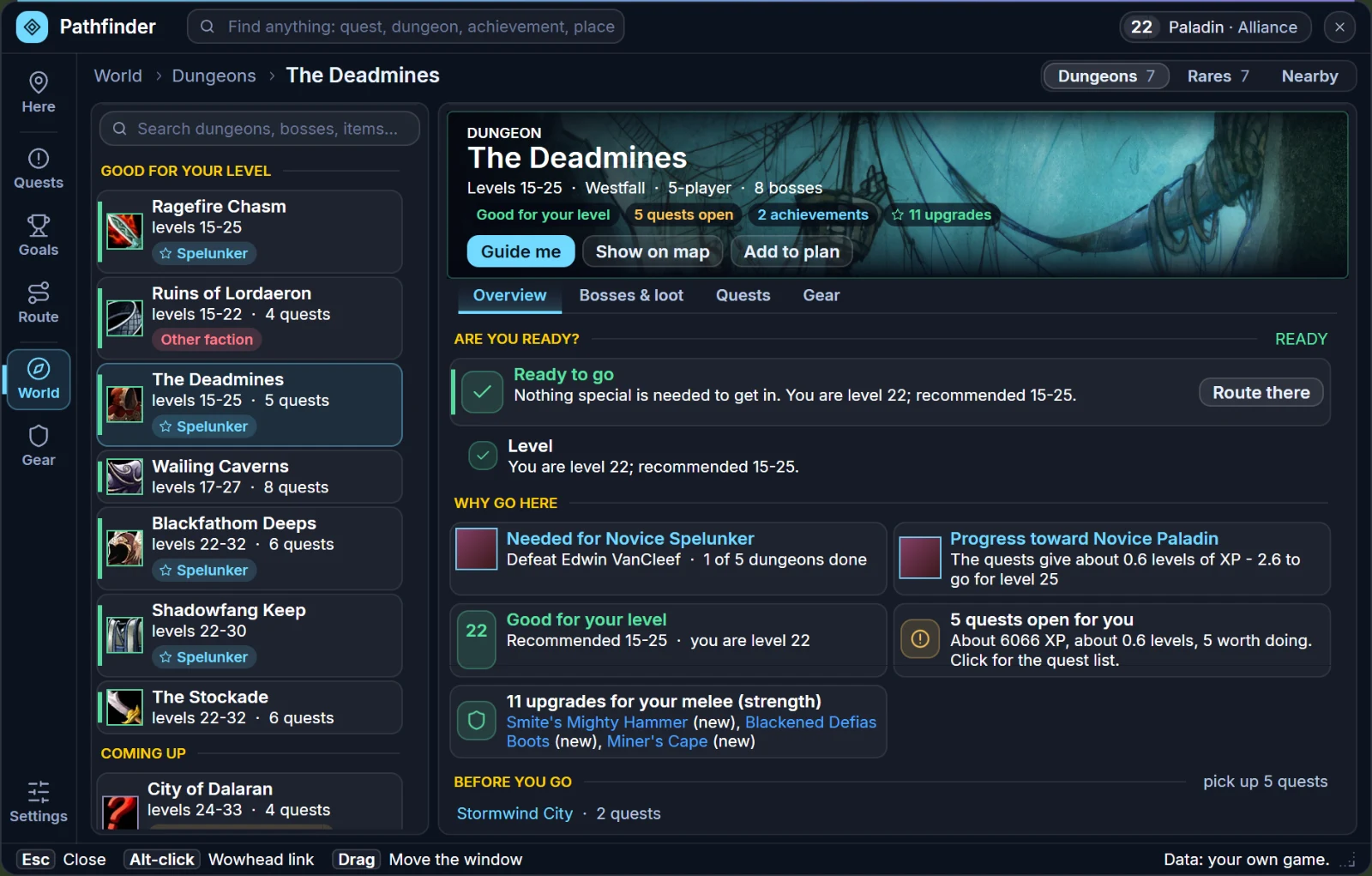
Next to the quest tracker with its arrow there is now a Plan window — a whole new, separate window with every dungeon, how to get each achievement, and quest chains with level and Elite tags. The achievements stay the guideline: every dungeon and quest tells you which achievement it gives, and every achievement tells you what to do for it.

The Plan window of Pathfinder for WoW Forever in its new glass look: The Deadmines with its banner, the Ready to go check, why to go there, the achievements it counts for and gear upgrades

An illustration rendered from the addon's own layout with sample character data (a level 22 Paladin) — not an in-game capture. Tap to enlarge.

Every dungeon, front to back

A banner, its bosses, the loot with drop chances and the quests to pick up on the way — 23 Forever dungeons.

Gear that beats what you wear

727 items compared with your equipped gear. Upgrades are marked and the best in slot gets a star.

Achievements stay the guideline

Every dungeon and quest tells you which achievement it gives. Every achievement tells you what to do for it.

Levels and Elite tags

Every quest shows its level. Elite quests are flagged so you bring help, and dungeon quests are marked D.

Quest chains with the steps that count

Steps, XP and level requirements, and which chains are worth your time.

Minimap icon & Plan button

Left-click the minimap icon to open the Plan window, right-click for the menu. The tracker has a Plan button too.

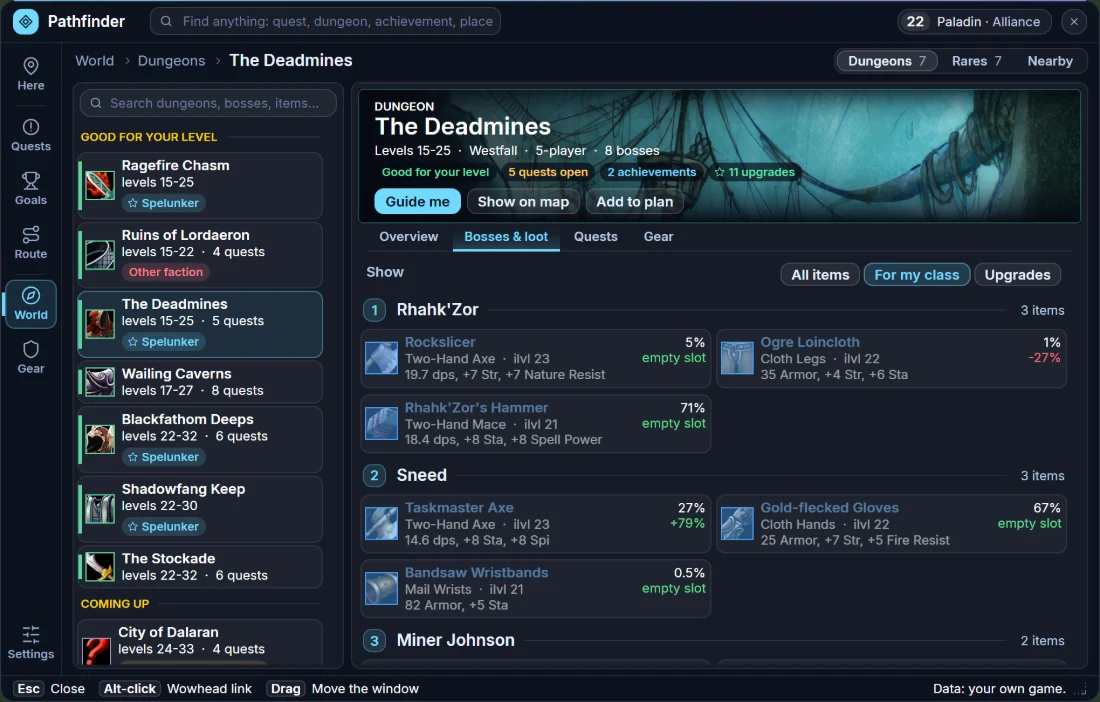
Plan window, Bosses and loot tab: the bosses of The Deadmines with every drop, its drop chance and the upgrade compared with equipped gear
Bosses & lootEvery drop with its drop chance, and which pieces beat what you wear
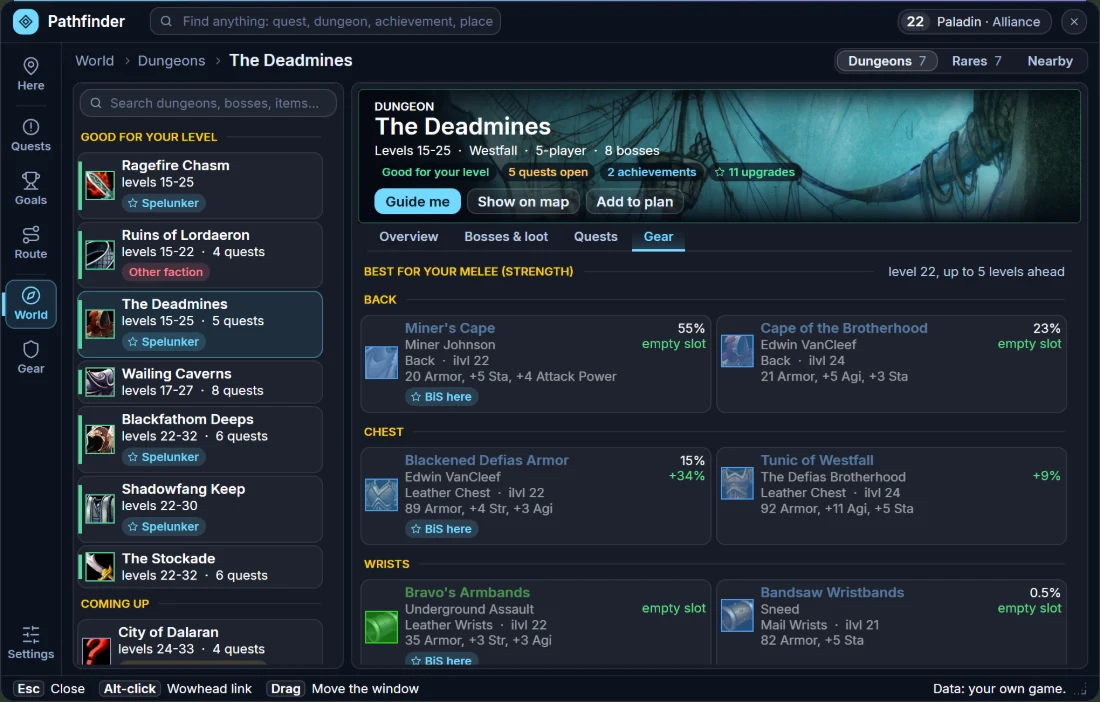
Plan window, The Deadmines, Gear tab: the best pieces for a level 22 melee Paladin slot by slot, each with the boss that drops it, its drop chance, the upgrade in percent over what is worn and a BiS here tag
Gear in the dungeonThe best pieces for your class and level from a dungeon, with the drop chance and how much better they are than what you wear
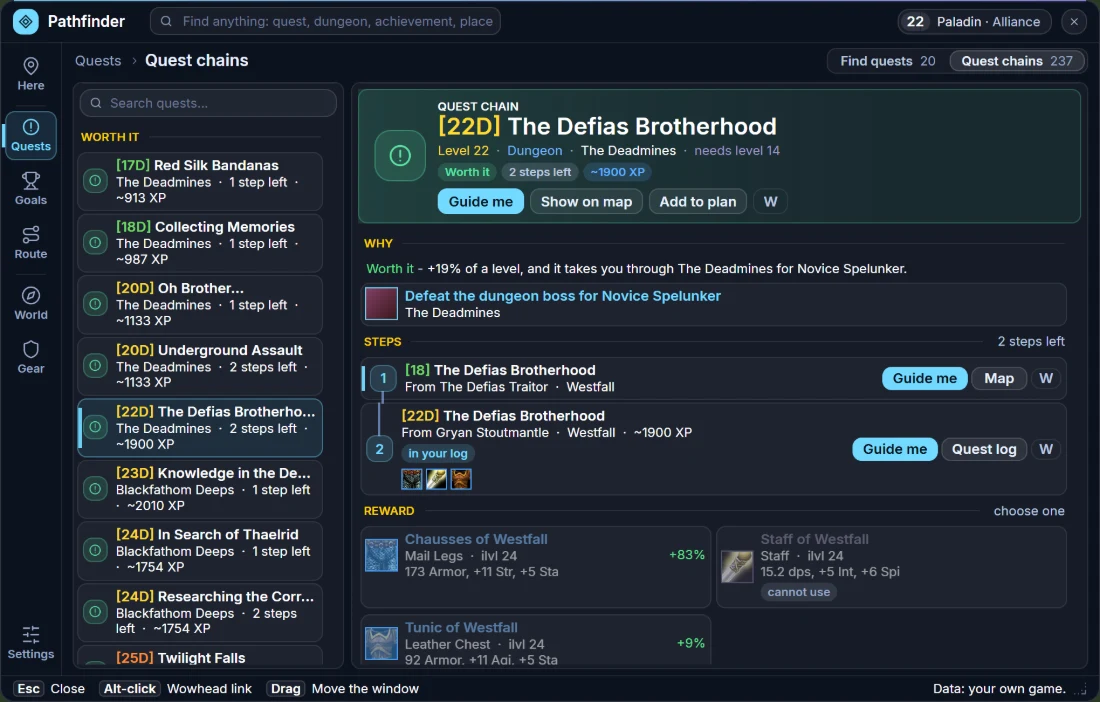
Plan window, Quest chains: the chain The Defias Brotherhood with a Worth it tag, why it is worth doing, its two steps with where to pick each up and the one in your log marked, and the reward to choose from with the upgrade shown in percent
Quest chainsA chain step by step: what is in your log, where to pick up the next step, the reward and a Guide me on every step
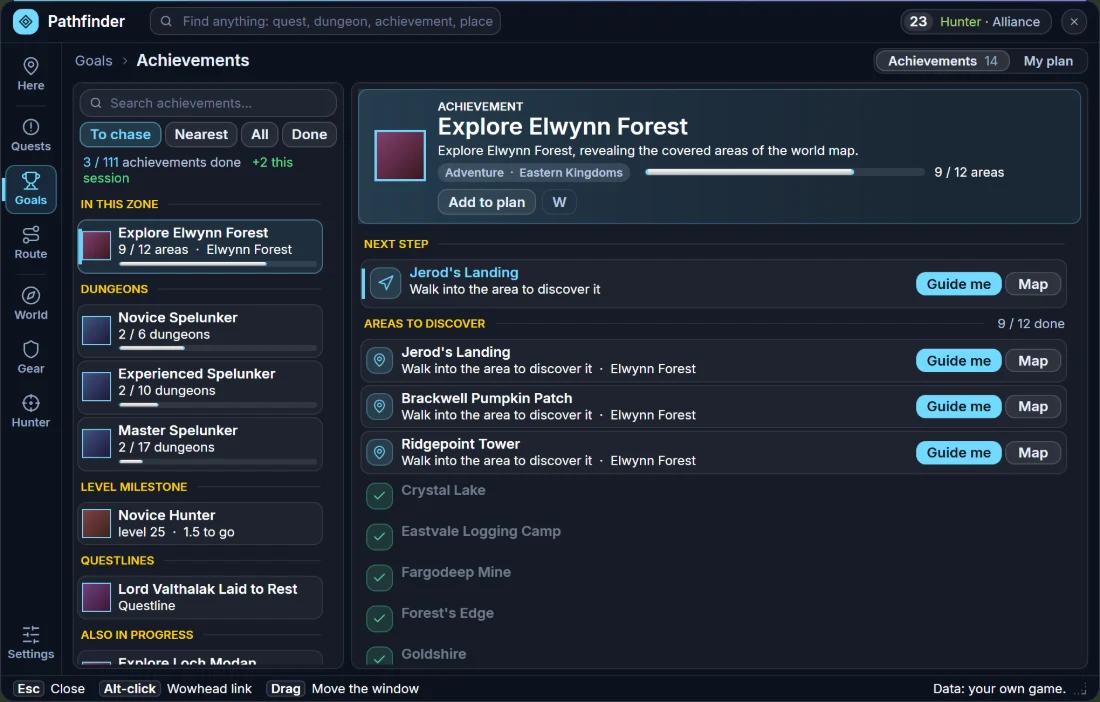
Plan window, Achievements: the To chase view with the zone you are in, the dungeons, your level milestone and the page of Explore Elwynn Forest with its next step and the areas to discover
AchievementsAll of them, in four views, with your progress
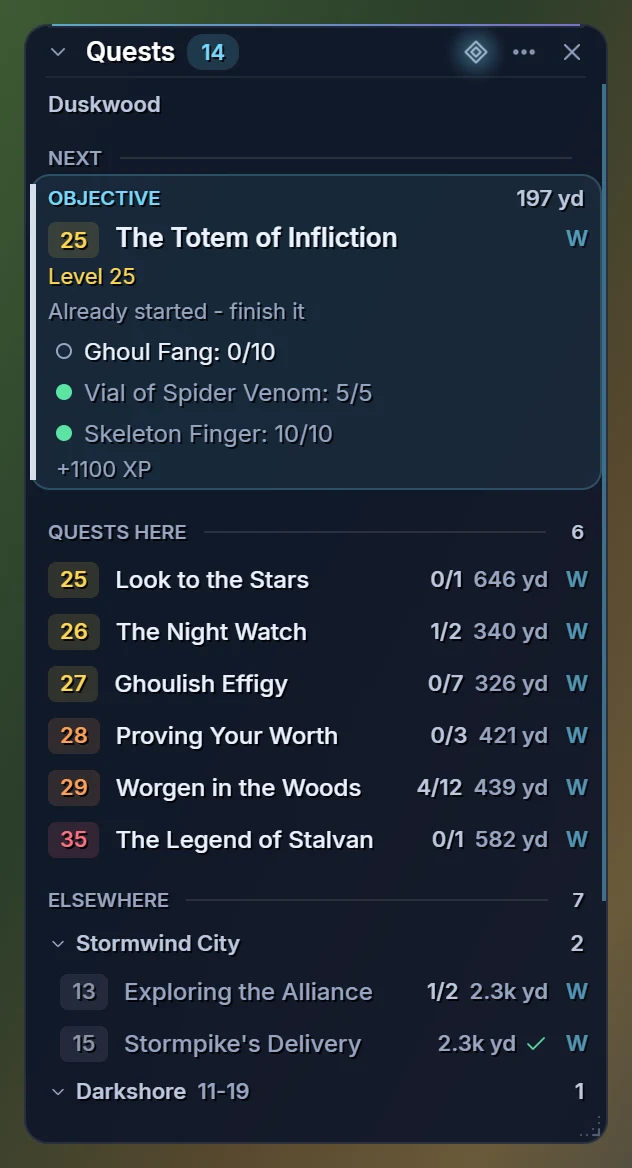
The quest tracker in the new glass look: the next objective with its level and progress, the quests here in level order and the zones under Elsewhere that fold
The quest tracker and its Plan buttonOne click from the quest you are on to the whole picture
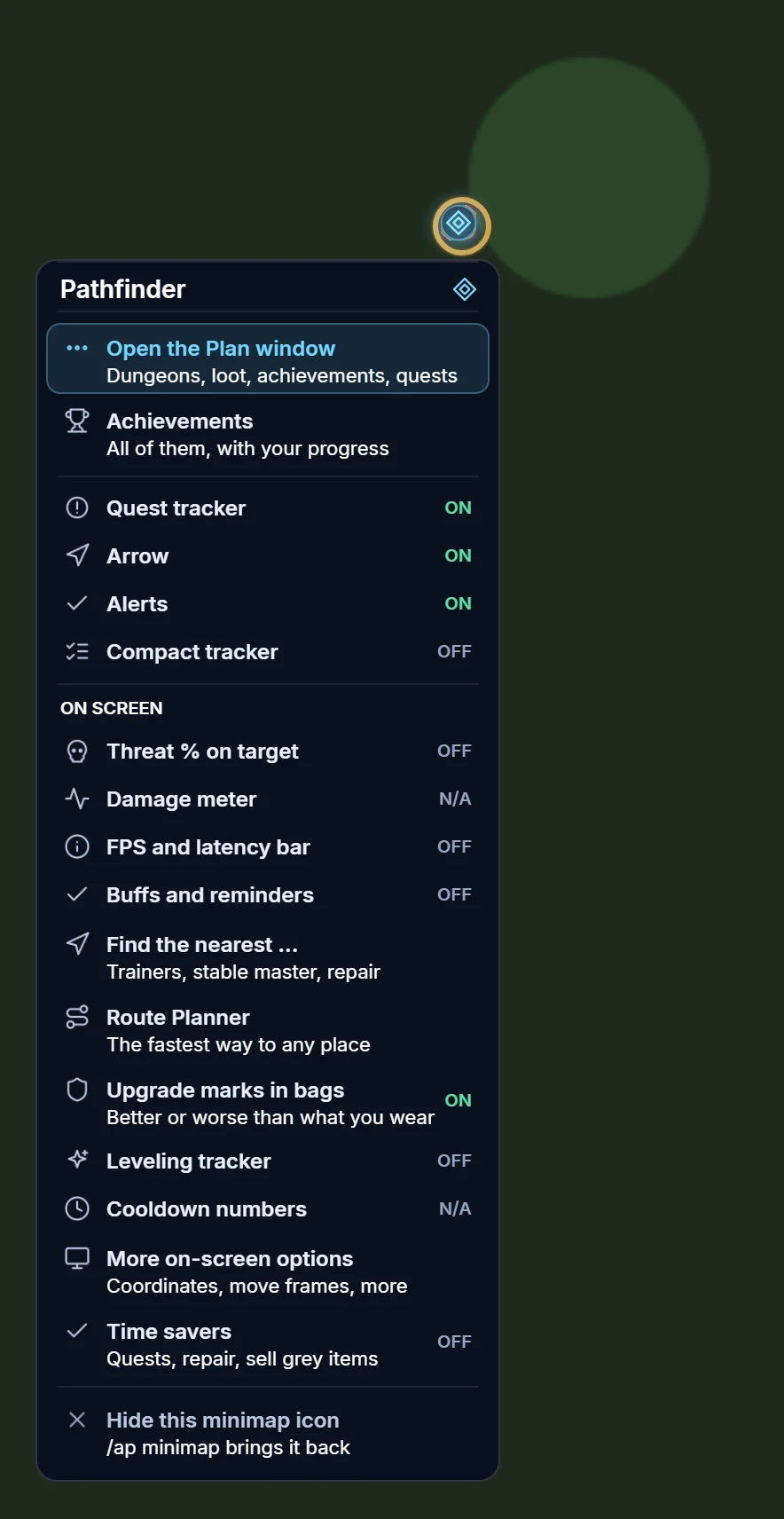
The minimap icon's right-click menu: open the Plan window, the achievements, toggles for the quest tracker, arrow, alerts and compact tracker, and the on-screen extras with Find the nearest, Route Planner and upgrade marks
Minimap iconLeft-click opens the Plan window, Shift-click the achievements, right-click opens this menu

The Plan window is part of the free Forever addon. It is not the AP Planner — that is a separate, invite-only Retail addon that picks which alt to play next.

New in 1.6.0 · WoW Forever

Every achievement, in one window

The Achievements section of the Plan window is now the whole list: all 111 achievements with your progress, four views, a search through all of them, metas that open their parts and the nearest trainer for a profession. It only shows information — the addon never plays for you.

To chase

The zone you are in first, then areas to explore, dungeons, your level milestone, questlines and anything else you have started.

Nearest

Everything you have started, with the fewest steps left first.

All, and Done

Every achievement by category with done and total, your own class first, and the ones you already have.

A search through all of them

Names, descriptions and categories, whichever view you are in. Clicking a view clears it.

Metas open their parts

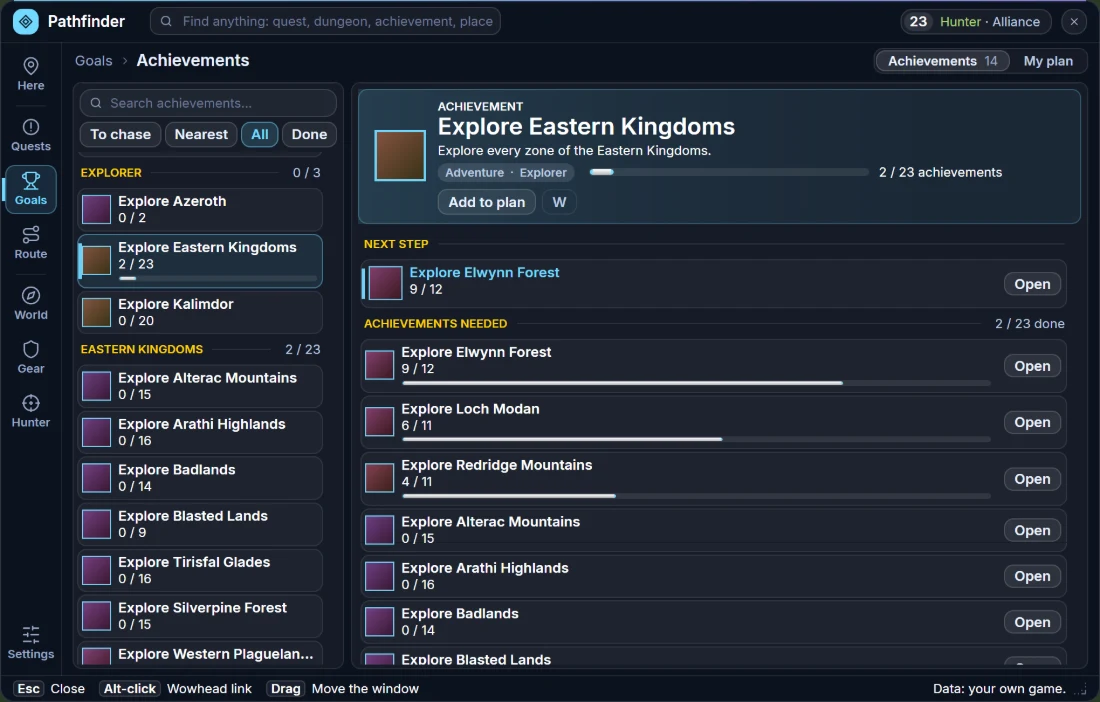
Explore Eastern Kingdoms lists every zone with its own progress and an Open button, the one closest to done first.

Skills and the nearest trainer

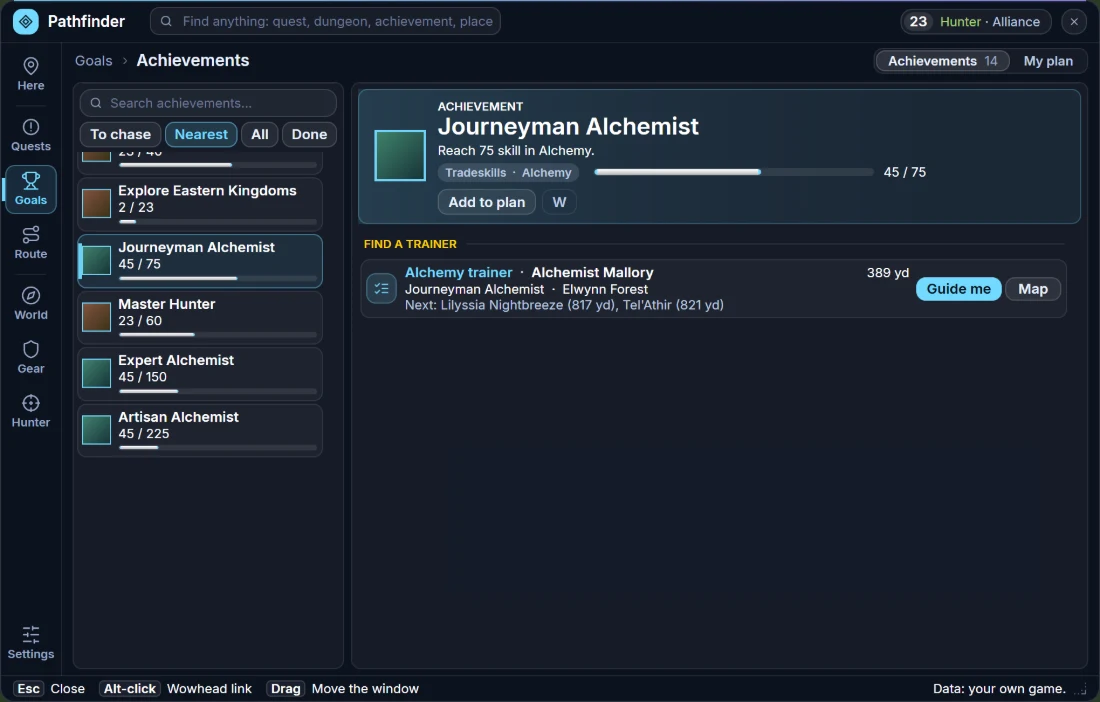
A bar with the numbers (skill 45 / 75, level 23 / 25), and on a profession achievement the nearest trainer with Guide me and Map.

Plan window, Achievements, the All view: every achievement grouped by category with done and total per category, and the page of the meta achievement Explore Eastern Kingdoms listing each zone with its own progress and an Open button
All of them, and metas that open their partsEvery achievement by category, and Explore Eastern Kingdoms listing each zone with its own progress
Plan window, Achievements, the Nearest view: everything started with the fewest steps left first, and the page of Journeyman Alchemist with a bar at 45 of 75 and the nearest Alchemy trainer with Guide me and Map
Nearest, skills and the way to the trainerA bar with the numbers, and the nearest trainer for a profession achievement

An illustration rendered from the addon's own layout with sample character data (a level 23 Hunter) — not an in-game capture. Tap to enlarge.

Type /ap or Shift-click the minimap icon to open it. The old compact window, with Compact mode and the opacity slider, is still there as /ap old.

On screen · since 1.4.0 · WoW Forever

Your threat, FPS, buffs and XP right where you play

Right-click the minimap icon — or the FPS bar itself — and switch on the extras you want on your screen. Everything is optional and off until you switch it on, you drag the frames where you want them, and the addon only shows information — it never plays for you.

Threat % above your target

How close you are to pulling the enemy: 100% means you take aggro. It flashes AGGRO when you hold it, and can list who else has threat.

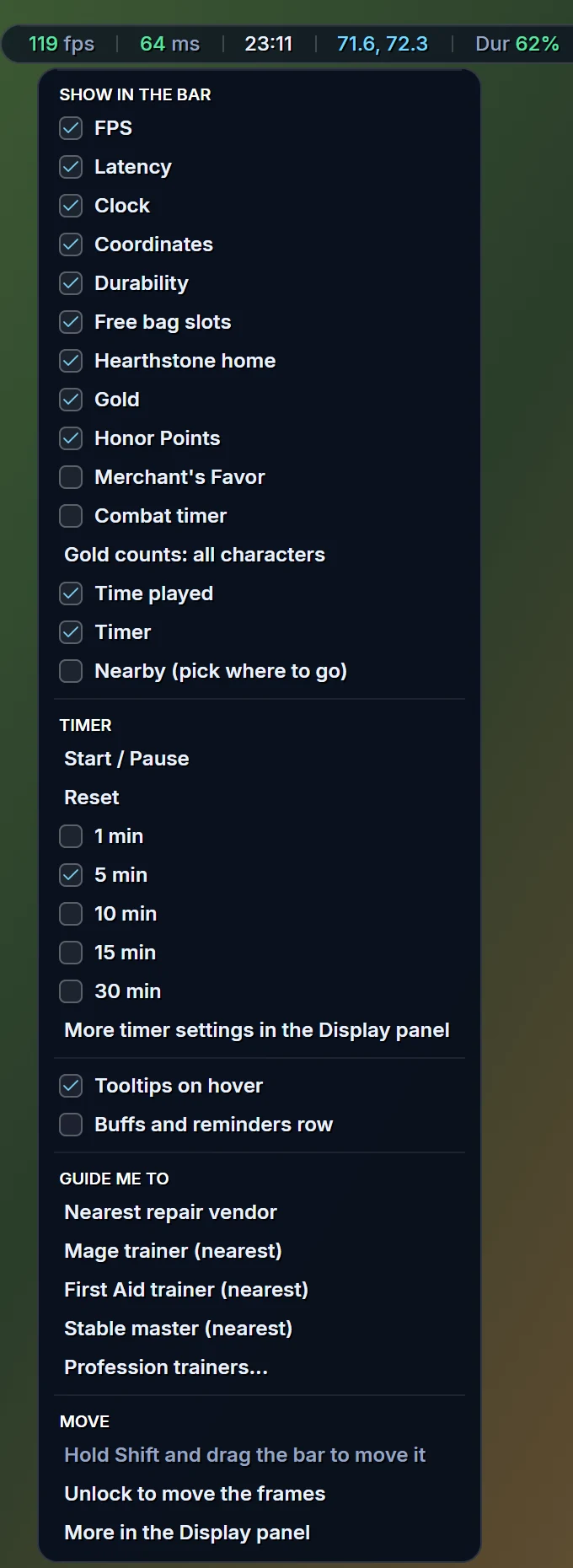
FPS and latency bar

Frames per second and latency, plus your clock, coordinates, lowest durability, free bag slots, gold and a combat timer. Right-click it to tick what it shows; hover any part for details.

Buffs and reminders

A row of buffs under the bar: amber, then red with a countdown before one runs out, and a reminder when a buff your class needs is missing.

Click Dur, get guided to repair

The bar shows your lowest durability. Click it and the arrow points to the nearest repair vendor; the guide ends when you open the vendor.

Leveling tracker

An XP bar with XP per hour, time to the next level and the XP waiting in your quest log, including quests ready to hand in.

Damage meter & cooldown numbers

One click turns on Blizzard's own damage meter and the seconds left on every ability button, with more of the game's switches in the Display panel.

Timer and time played

A countdown in the bar (/aptimer 5:30) with an alarm and the game's own sounds, and the time played of every character you have played.

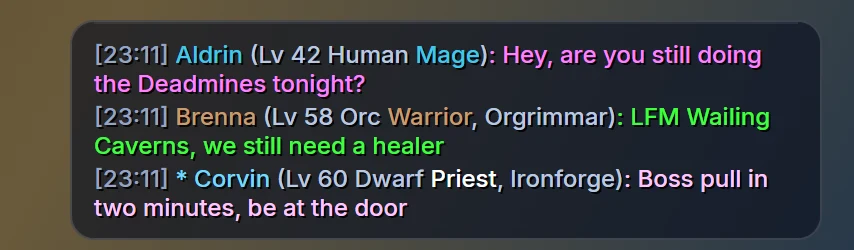
Whispers and guild chat

A see-through box with a glass plate behind the lines: whispers, guild and officer chat in their own colours, lines that fade, mute and mark names. It only reads chat.

A tracker you can shape

Drag its corner to resize it, make it see-through, set the text size and row spacing with sliders, or let it replace the game's own quest tracker.

The info bar with fps, latency, clock, coordinates, durability, bags, hearthstone home, gold, honor points, a timer and time played, a row of buffs with a reminder, and the leveling tracker with its XP bar
The bar, the buff row and the leveling trackerGlass plates: coordinates, buffs that warn before they run out, and quest XP in amber
The whisper and guild chat box: three lines of whispers and guild chat in different colours on a glass plate, with the speaker's level, class and race
Whispers and guild chatA see-through box with a glass plate behind the lines that fades with them
The right-click menu of the info bar under the bar itself, with check boxes for FPS, latency, clock, coordinates, durability, free bag slots, hearthstone home, gold, honor points, time played and a timer with its start, pause and reset entries
Right-click the barTick what it shows, start a timer, or be guided to the nearest repair vendor or trainer

An illustration rendered from the addon's own layout with sample character data — not an in-game capture. Tap to enlarge.

Forever hides some combat information from addons, so the addon does not draw enemy cast bars or a combat log meter — that is why the damage meter is the game's own.

New in 1.5.0 · WoW Forever

Check your gear, find your trainer, tame the right pet

Three helpers for the questions you ask every few minutes: is this item better than what I wear, where is the nearest trainer or stable master, and is there a better pet around here. They only show information — the addon never plays for you.

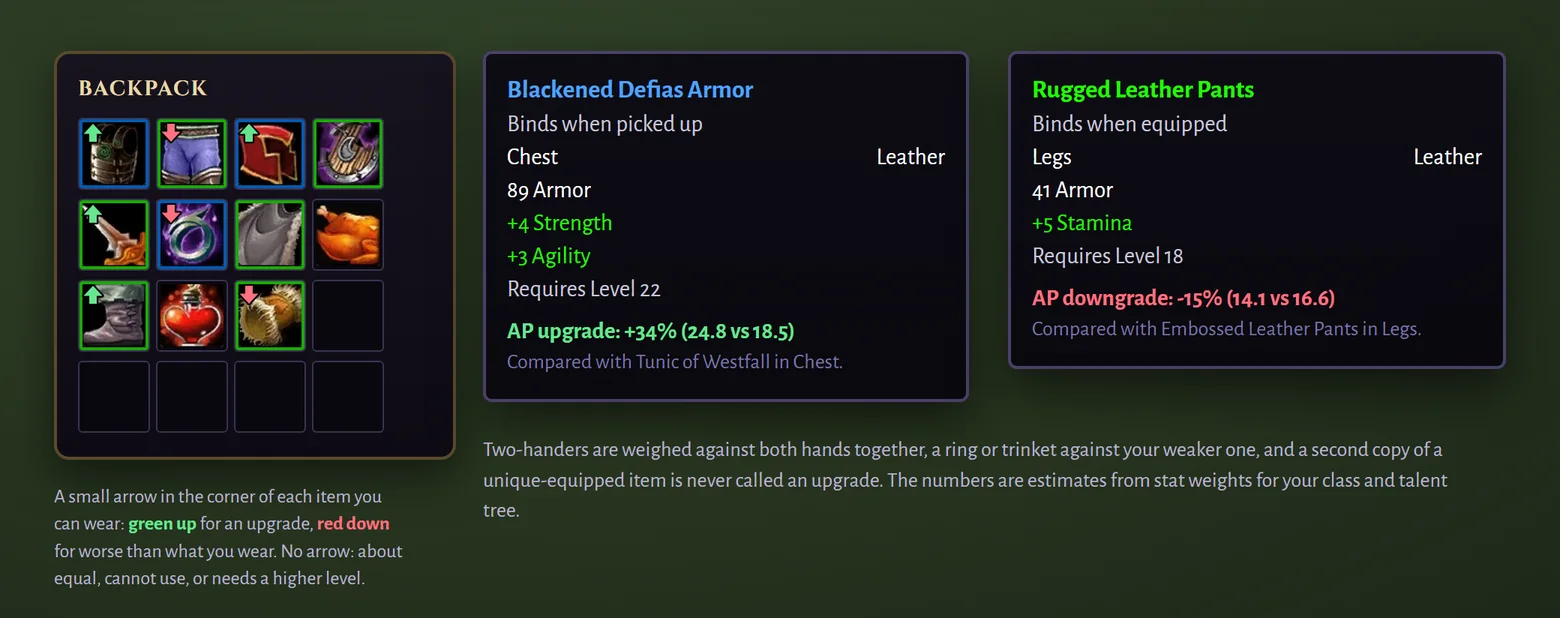
Better or worse, at a glance

Hover an item for the numbers. In your bags a green arrow marks an upgrade and a red one something worse than what you wear. Two-handers, rings, trinkets and unique items are handled.

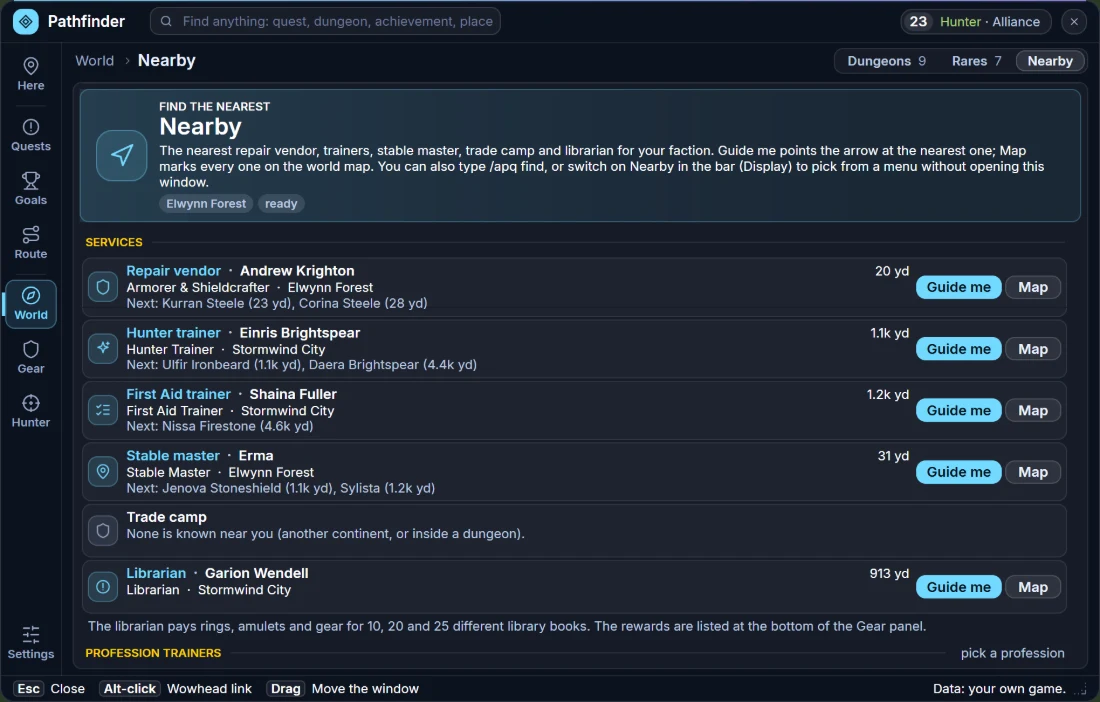
Nearest trainers, stable master, repair

Class trainer, First Aid, any profession, stable master and repair vendor. Guide me points the arrow; Map marks them, and the others in the zone show as small dots.

Hunter's guide

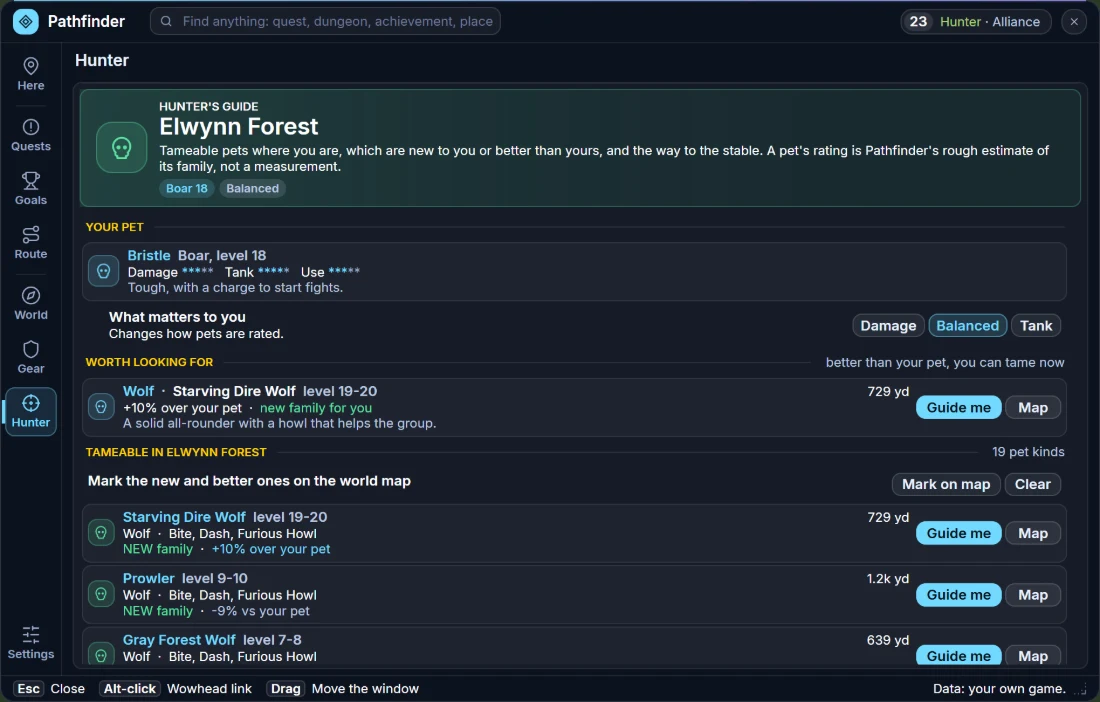
Your pet, the best tameable beasts you can tame now, every tameable beast in your zone (new family, better or worse than yours, rare, elite) and the way to the stable.

Items in a backpack with a small green arrow on upgrades and a red arrow on downgrades, next to two item tooltips: AP upgrade +34 percent and AP downgrade -15 percent, each with the item it was compared with

Upgrade marks: numbers in the tooltip and a small arrow on the item in your bags. An illustration with sample items — not an in-game capture. Tap to enlarge.

Plan window, Nearby: the nearest repair vendor, hunter trainer, First Aid trainer, stable master, trade camp and librarian with Guide me and Map buttons
NearbyThe nearest trainers, stable master and repair vendor, with an arrow and map markers
Plan window, Hunter's guide: your pet, a pet worth looking for and the tameable beasts of Elwynn Forest tagged as new family or better than your pet
Hunter's guideTameable pets in your zone, new or better than yours, and the way to the stable

An illustration rendered from the addon's own layout with sample character data — not an in-game capture. Tap to enlarge.

The upgrade numbers are estimates from stats, like Pawn's, and a pet's rating is the addon's own rough estimate for its family — neither is a measurement.

Retail addon

Midnight · The War Within · every expansion
  • A new window New in 1.4.0 — Here (the zone you stand in and your next best step), Goals (every achievement, the metas and your own plan) and Settings with a live preview. /ap old still opens the window you know.
  • Zone-aware — what's missing where you stand, the second you arrive.
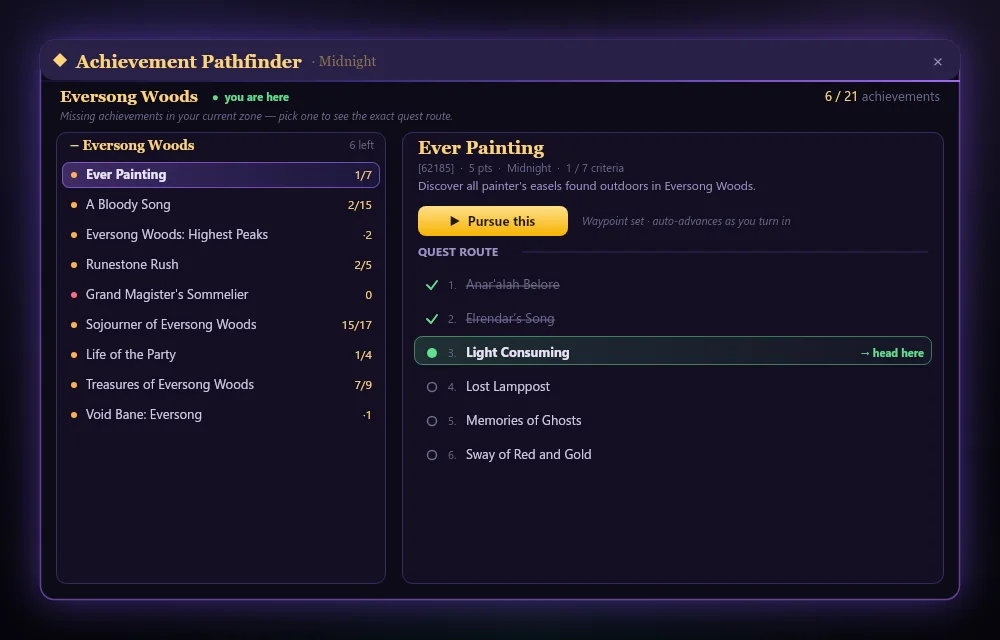
  • Pursue — a quest-by-quest route with auto-advancing waypoints.
  • TomTom & HandyNotes arrows for treasures, rares and glyphs.
  • Nearest completion and Compact mode built in.
  • Metas — mount and title metas like Light Up the Night: what's left right where you stand, then zone by zone.

Free direct download — also on CurseForge.

Retail web app

Battle.net sign-in · EU · US · KR · TW
  • Browse all 9,000+ achievements free — categories, criteria, search.
  • Log in with Battle.net to overlay your own characters' status for free.
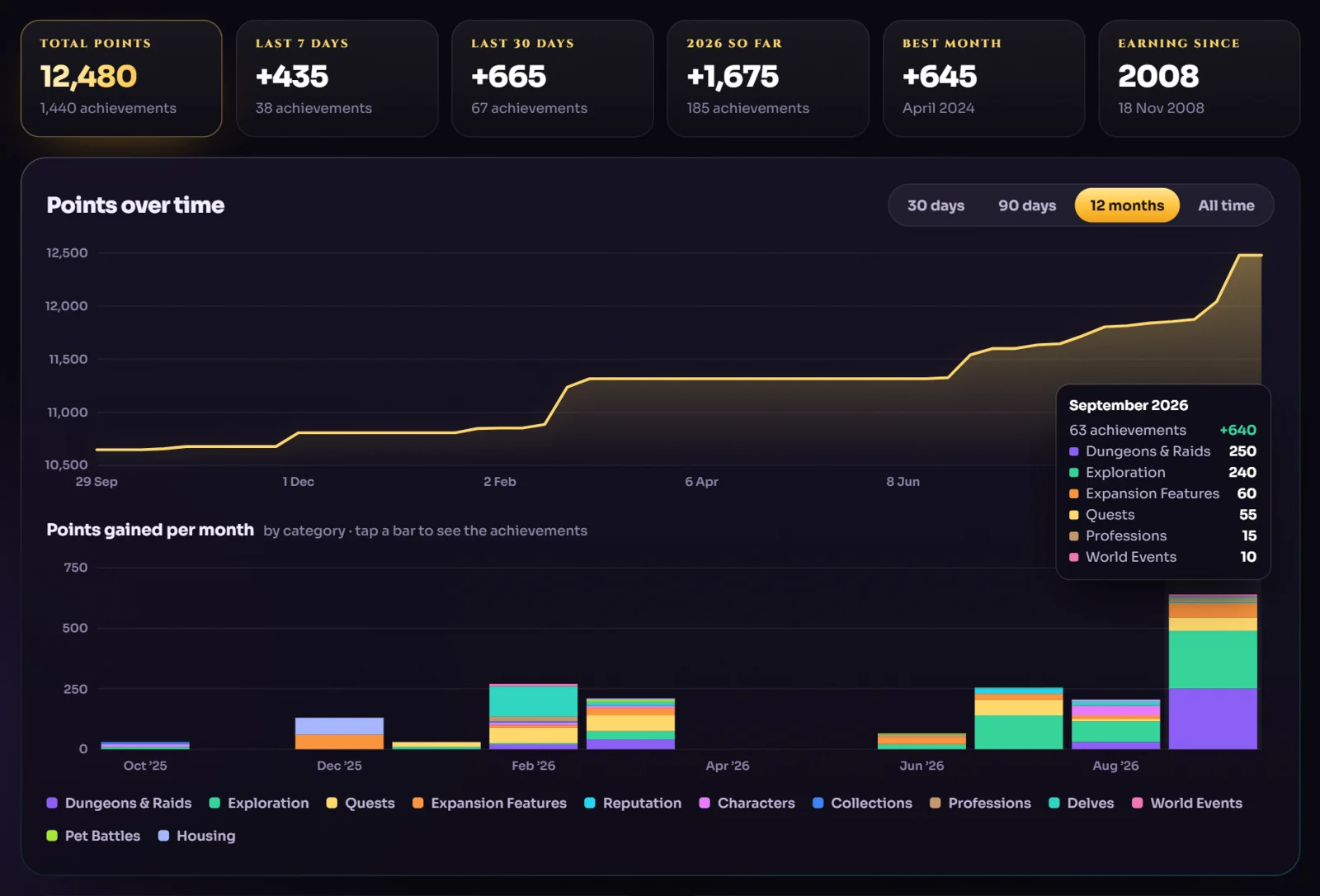
  • Progress over time — your points per month and category, back to your very first achievement.
  • Nearest completion across every character on your account.

Battle.net login is free for Retail status. The Warband Planner is invite-only — join the Planner waitlist.

Warband Planner — join the invite-only waitlist

The Warband Planner is invite-only. Email info@wowap.app and include your BattleTag (e.g. Name#1234) to join the waitlist — licences are handed out monthly, first come, first served.

Join the waitlist
Addon 1 · Achievement Pathfinder · free

It knows where you are — and what you're missing

Open it with /ap or the minimap button. Everything reads live from the game, so it's always right — on every character.

  1. Zone-aware list

    The achievements you still need in your current zone, sorted and counted.

  2. Pursue, quest by quest Retail

    The exact quest route with a waypoint that auto-advances as you turn in.

  3. A new window New Retail

    Here, Goals and Settings in one glass window: your next best step, every achievement and meta, your own plan and a live preview of what the addon says.

  4. Live progress

    Criteria tick off the moment you explore a sub-zone or finish a step — no reloads.

  5. Nearest completion

    Surfaces the achievements you're closest to finishing, across every category.

  6. Compact mode New

    Shrink to just the detail panel plus an achievement dropdown — made for questing.

  7. Plan window New Forever

    A whole new window with every dungeon, its bosses and loot, the gear that beats yours, and how to get each achievement.

  8. Quest levels & Elite tags Forever

    Levels everywhere, Elite quests flagged, dungeon quests marked.

  9. Your turn

    Download, drop it in AddOns and type /ap.

Want to know which alt to play next? That's the separate AP Planner addon →

Achievement Pathfinder addon in-game: Eversong Woods achievements with a quest-by-quest route and Pursue button
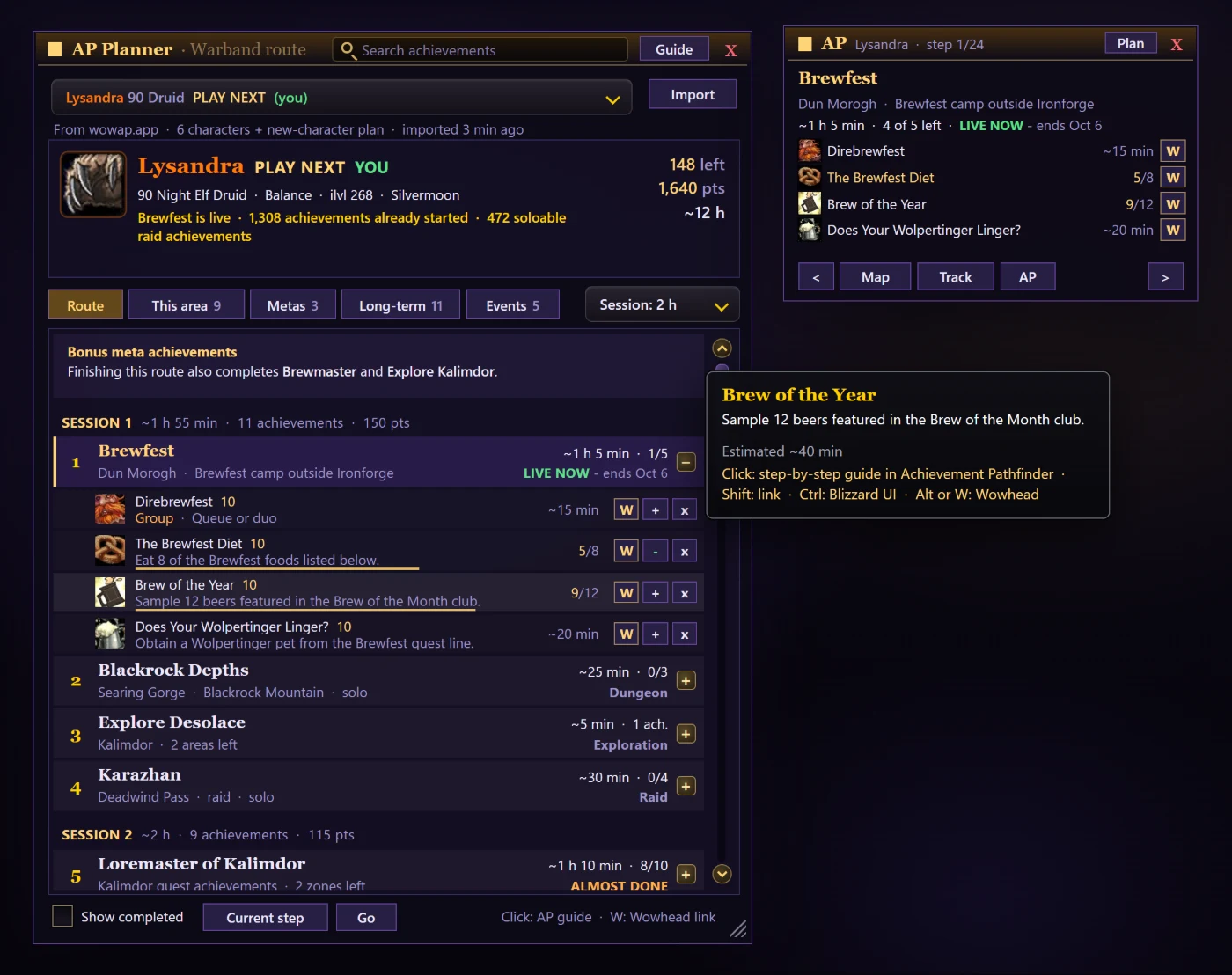
AP Planner addon in-game: warband route, Guide panel and Wowhead links Addon 2 · AP Planner · invite-onlyThe most advanced achievement addon ever madePicks which alt to play next and routes your whole warband. A separate addon. See AP Planner →
The web app

Every achievement. Every character. Every screen.

No addon, no setup — open it in any browser, or install it like a native app. Free to browse; sign in with Battle.net to see your own Retail characters.

Instant search

Names, descriptions and categories across 9,000+ achievements.

Filters that stick

Category pills and toggles, remembered between visits.

Nearest completion

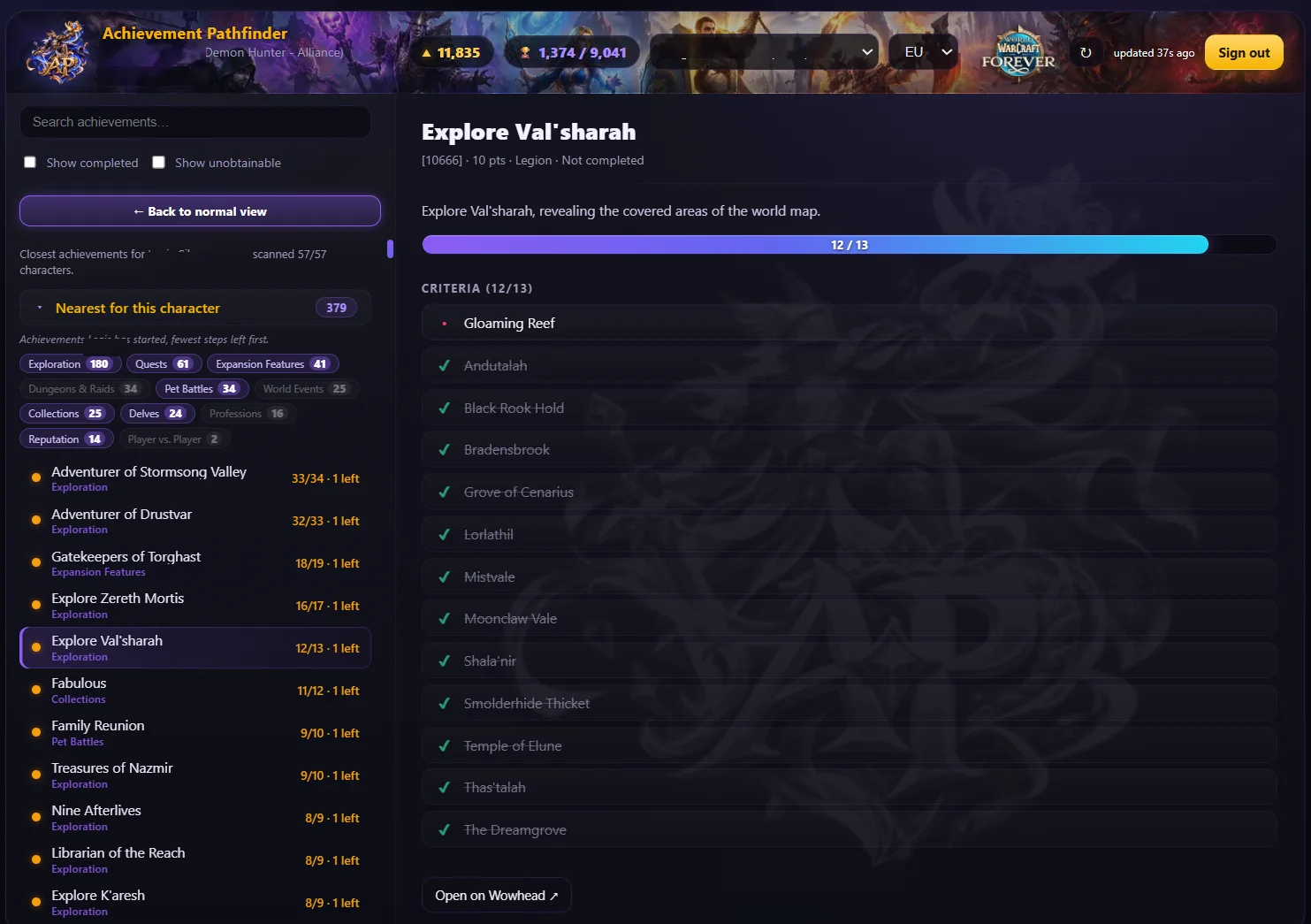
Every character scanned; the closest finishes first.

Installable

Add to your home screen or desktop — it opens straight into the app.

Four regions

EU, US, KR and TW — switch any time.

Battle.net sign-in

No passwords, no API keys. Read-only, official OAuth.

wowap.app
Achievement Pathfinder web app: nearest-completion view with Explore Val'sharah criteria and progress
Achievement Pathfinder web app on a phone: WoW Forever achievement catalog by category
New · free with Battle.net login

Watch your points grow over time

Log in with Battle.net and Achievement progress charts every point your characters have ever earned — month by month and category by category, all the way back to your very first achievement. Nothing to install, nothing to track: your whole history is there the moment you sign in.

wowap.app/progress
Achievement progress in the web app: achievement points over time, points gained per month by category and totals per category
Points over time

30 days, 90 days, 12 months or all time — hover for the exact total.

By category

Dungeons & Raids, Exploration, Quests… see where your points come from.

Every month, unpacked

Tap a bar to list exactly what you earned that month.

Instant history

Every character counted once — back to your very first achievement.

Addon 2 · AP Planner · separate addon

Which alt tonight? We already know.

Warband Planner scans every character on your account and weighs faction, race, class, spec, level and progress across 6,300 obtainable achievements — then hands you one character, one bundle and one route, plus the new character that would unlock the most.

Not part of the free Achievement Pathfinder addon — AP Planner is a separate addon (plus web planner) that you install next to it. The Planner picks the alt and the route; Achievement Pathfinder guides you quest by quest.

One character, one bundle

Consolidated — not one alt per achievement.

Every restriction

Faction, race, class and role, straight from the game data.

A route, not a list

Live events, near-finished, then one trip per zone or raid.

Roll the right alt

Every race & class tested, with a spec and leveling path.

AP Planner addon in World of Warcraft: warband route for Lysandra with Brewfest live, a step-by-step Guide panel, live achievement progress and a Wowhead link on every achievement
In-game · AP Planner addon

The most advanced achievement addon ever made.

Pick the alt on the web, play the route in WoW. One paste sends your plan into the game: the same sessions and order as the web, live achievement progress, a Guide panel that auto-advances step by step, waypoints, objective-tracker support and a Wowhead link on every achievement.

  • Minimap icon → Import → Ctrl+V
  • Picks the character you're logged in on
  • Hands off to Achievement Pathfinder for quest-by-quest steps

Invite-only — mail info@wowap.app with your BattleTag to join the waitlist. Licenses go out monthly, first come, first served.

Free / login / invite-only

Exactly what you get — no fine print

Two free addons, a web app and the separate, invite-only AP Planner — every edition side by side.

Achievement Pathfinder editions compared
Feature Forever addonIn-game Forever webAny browser Retail addonIn-game · free Retail webFree login AP PlannerSeparate addon · invite
Price Free Free Free Free with Battle.net login Invite-only licence
Every achievement, searchable Yes Yes Yes Yes No
Your own progress Live, per character When Blizzard opens the API Live, per character Free login Whole warband
Nearest completion Yes No Yes Free login Yes
Points over time, by category No No No Free login No
Zone-aware list Yes No Yes No No
Quest-by-quest route + waypoints Tracker + arrow No Yes No Via AP addon
Plan window: dungeons, quests, achievements New in 1.3.0 No No No No
Glass window: Here, Goals, Settings New in 1.6.1 No New in 1.4.0 No No
Dungeon loot & best in slot Gear that beats yours No No No No
Quest levels & Elite tags Yes No No No No
On-screen extras: threat %, FPS bar, buffs Optional No No No No
Upgrade marks on bag items (like Pawn) New in 1.5.0 No No No No
Nearest trainers, stable master & repair vendor New in 1.5.0 No No No No
Hunter's guide: tameable pets by zone New in 1.5.0 No No No No
Every achievement in the Plan window: 4 views, search New in 1.6.0 No No No No
Route Planner: boats, flights, hearthstone New in 1.6.1 No No No No
Find quests: what you can take, and why not New in 1.6.1 No No No No
Gear page: what you wear vs what is better New in 1.6.1 No No No No
Recommended levels on the continent maps New in 1.6.1 No No No No
Scroll through the maps, zone levels on the world map New in 1.6.3 No No No No
Click a quest marker on the map to follow it New in 1.6.3 No No No No
Meta achievements, zone by zone New in 1.6.0 No Yes No Metas tab
Compact mode Yes No Yes No No
Works on phone & any browser No Yes No Yes Web planner
Which alt to play next No No No No Whole warband
Best new character to roll No No No No Yes

Retail status and both addons are free. The Warband Planner is invite-only: email info@wowap.app with your BattleTag (e.g. Name#1234) — licences are handed out monthly, first come, first served.

Get started

Three steps. Two minutes.

Prefer the browser? Just open the web app — there's nothing to install.

  1. 1

    Download

    Grab the free Retail or WoW Forever addon — a small zip, no installer.

  2. 2

    Drop it in AddOns

    Unzip into Interface\AddOns and enable it on the character screen.

  3. 3

    Type /ap

    Or click the minimap icon — your missing achievements appear instantly. On WoW Forever it opens the Plan window, and /ap goes straight to every achievement in it.

FAQ

Questions, answered

Is Achievement Pathfinder safe to use — is it allowed by Blizzard?

Yes. The addon uses only Blizzard's official in-game addon API and the web app uses the official Battle.net API. It reads what the game already shows you and organizes it — no automation, no botting, nothing that plays for you. It is in the same category as TomTom or quest-guide addons.

Does it work with WoW Forever (Classic-Plus)?

Yes. The WoW Forever edition (version 1.6.4, called Pathfinder in the game's addon list) is your one stop shop for achievements, dungeons and quests: a quest tracker with an arrow, a Plan window in a new glass look with a Route Planner, Find quests, Gear and Display pages, upgrade marks on the items in your bags, the nearest trainers and stable master, a Hunter's guide, optional on-screen extras (threat %, an FPS bar with coordinates, a buff row, a leveling tracker), and every one of the 111 Forever achievements with live per-character progress, in four views and with a search. The full catalog is also browsable in the web app and on the Forever achievements page.

What is the Plan window?

A whole new, separate window in the WoW Forever addon with every dungeon (a banner, its bosses, loot and the gear that beats what you wear), every achievement with your progress and how to get it, and quest chains with level and Elite tags. Since 1.6.1 it has a new glass look with eight hubs (Here, Quests, Goals, Route, World, Gear, Hunter and Settings), a search box that finds quests, dungeons, achievements and places while you type, and pages of their own for Find quests, the Route Planner, Gear and Display. The achievements stay the guideline: every dungeon and quest tells you which achievement it gives, and every achievement tells you what to do for it. Open it with the minimap icon, the Plan button on the tracker, or /ap plan; /ap and Shift-click on the minimap icon go straight to its Achievements section. It is part of the free Forever addon and separate from the invite-only AP Planner.

Does it show quest levels and Elite quests?

Yes. In the WoW Forever addon every quest shows its level, Elite quests are tagged so you know to bring help, and dungeon quests are marked with a D — in the tracker, in the quest chains and in the Plan window.

What are the on-screen extras?

In the WoW Forever addon, right-click the minimap icon and look under ON SCREEN, or open Display in the Plan window. Threat % shows how close you are to pulling the enemy right above your target's portrait, with an AGGRO alert and an optional group list. An FPS and latency bar can add your clock, coordinates, durability, free bag slots, gold and a combat timer; right-click the bar to tick what it shows, hover any part for details, and click Dur to be guided to the nearest repair vendor. A row of buffs under the bar warns you before a buff runs out and reminds you of missing class buffs. A leveling tracker shows XP per hour, time to the next level and the XP waiting in your quest log. One-click switches turn on the game's own damage meter and cooldown numbers. Everything is optional and off until you switch it on, you can drag the frames where you want them, and it only shows information — the addon never plays for you.

Can it tell me if an item in my bags is an upgrade?

Yes, in the WoW Forever addon. Hover an item you can wear and its tooltip says how much better or worse it is for your class and talent tree (for example +14%), with both scores and the item it was compared with. In your bags the item's icon gets a small arrow: green up for an upgrade, red down for worse than what you wear. It is an estimate from stats, like Pawn's, and you can switch the marks off in the Display section.

Can it find the nearest trainer, stable master or repair vendor?

Yes. The Nearby section of the Plan window (or /apq find) shows the nearest repair vendor, your class trainer, a First Aid trainer, the stable master and a trainer for any profession you pick. Guide me points the arrow at it and also marks the others of that kind in the zone on the world map; Map marks every one of that kind. The positions come from Wowhead's Forever database.

Is there anything for hunters?

Yes. Hunters get a Hunter's guide in the Plan window (/apq hunter): your pet, tameable beasts worth looking for, every tameable beast in the zone you stand in with tags for new families and pets better than yours, and the way to the stable master — all markable on the world map. The pet ratings are the addon's own rough estimates, not measurements.

What is the Route Planner?

The Route page of the Plan window in the WoW Forever addon (or /pf route and a place) plans the fastest way from where you stand to a zone, city, town, dock or dungeon. It combines walking, the flight paths you have found, boats, zeppelins, your hearthstone and the teleport spells you know, and lists the steps with the time of each, a time bar and other ways to go. Guide me makes the arrow follow the route and Show on map draws it on the world map. All times are estimates: a boat's schedule is not visible to an addon.

Can it show which quests I can pick up?

Yes. Find quests in the Plan window knows more than 5,000 Forever quests and compares them with your level, side, class, race and the quests you have done. It lists, zone by zone, what you can take now and what is locked and why (a level, an earlier quest), and shows the quest you pick with what it needs, where to pick it up and hand it in, the reward and its whole quest chain. It cannot see reputation or events, so the game can still refuse a quest it lists as available.

Why is the addon called Pathfinder now?

Because it does far more than achievements: quests, dungeons, routes, gear and your screen. The WoW Forever addon is called Pathfinder in the game's addon list since version 1.6.1. Nothing else changes: your settings come along, /ap and /apq work as before, and /pf is new. The folder is still named AchievementPathfinder, and the Retail addon keeps its name.

How do I see all my achievements in the WoW Forever addon?

Type /ap, or Shift-click the minimap icon: the Achievements section of the Plan window lists all 111 Forever achievements with your progress, in four views — To chase (the zone you are in, areas to explore, dungeons, your level milestone, questlines and anything else you have started), Nearest (everything you have started, the fewest steps left first), All (by category, your own class first) and Done — and a search through all of them, whichever view you are in. A meta achievement such as Explore Eastern Kingdoms opens its parts with their own progress, skills and levels get a bar with the numbers, and a profession achievement shows the nearest trainer. The old compact window is still there as /ap old.

Is it free?

The Retail addon, the WoW Forever addon, Retail web character status and Achievement progress are free. Log in with Battle.net to see your own Retail characters. The Warband Planner is invite-only.

Can I see my achievement points over time?

Yes. Sign in with Battle.net (free) and open Achievement progress at wowap.app/progress. It charts your achievement points over time and per category, lists exactly what you earned each month and goes all the way back to your very first achievement, because Blizzard stores the date of every achievement. Retail characters only.

How do I get Warband Planner access?

The Warband Planner is invite-only. Email info@wowap.app with your BattleTag (for example Name#1234) to join the waitlist — licences are handed out monthly, first come, first served.

Why doesn't the web app show my WoW Forever characters yet?

Blizzard has not opened a public web API for WoW Forever character profiles yet. The web app is built for it — your Forever status will appear as soon as the API exists. Until then the in-game addon shows your live progress.

Which regions are supported?

Europe, the Americas (US), Korea and Taiwan — EU, US, KR and TW.

Do I need TomTom or HandyNotes?

No. They are optional. On Retail, TomTom gives you a stable arrow and HandyNotes adds treasure and rare pins; the addon uses them automatically when they are installed.

What is Compact mode?

A tiny window that shows only the selected achievement — progress bar, criteria and route — with a dropdown to switch achievements. Perfect to keep on screen while you quest. On WoW Forever it is the compact window: type /ap old.

How do I install the addon?

Download the zip (or get it from CurseForge), unzip it into your World of Warcraft Interface\AddOns folder, make sure it is enabled on the character screen, then type /ap in chat or click the minimap icon. On WoW Forever /ap opens the achievements in the Plan window, the minimap icon opens the Plan window (Shift-click: the achievements) and right-click opens a menu.

Can I use the web app on my phone?

Yes. It works in any modern browser and can be installed like an app: choose "Add to Home Screen" or "Install" in your browser menu.

Your next achievement is one path away

Free addons. Built for Retail. Works on every screen.